Option 1 — open it here
- Drop the .plist file onto the editor above.
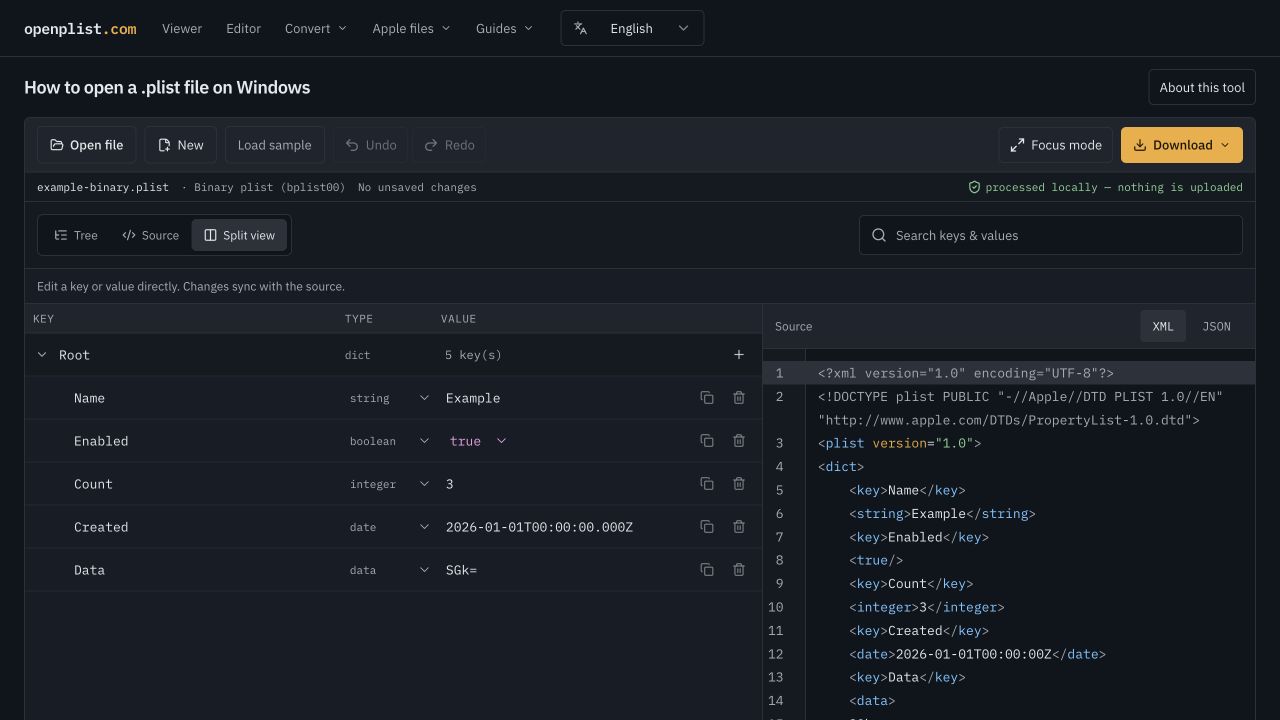
- Read it as a key / type / value tree, or as XML on the right.
- Edit any value, then use Download to save it as XML or binary.
Windows has no built-in property list support, and binary plists look like gibberish in Notepad. Drop the file below to read and edit it right away.
Apple property lists come in two common serializations. If the file starts with <?xml and mentions the PropertyList-1.0 DTD, it is an XML plist (Apple calls this format xml1). If the first bytes are bplist00 followed by unreadable symbols, it is a binary plist (binary1) — a text editor cannot help with those.
XML plists open fine in Notepad, Notepad++ or VS Code. Be careful editing by hand: every <key> must be followed by exactly one value element, tags are case-sensitive, and <integer>1</integer> and <real>1.0</real> are different types that Apple's PropertyListSerialization treats differently. A misplaced tag makes the whole file unreadable to macOS.
On a Mac you would run plutil -convert xml1 file.plist to turn a binary plist into readable XML — but plutil does not exist on Windows. With Python installed, the standard library reads both formats: python -c "import plistlib,sys;print(plistlib.load(open(sys.argv[1],'rb')))" file.plist. Useful in scripts, less pleasant for editing by hand — which is what the editor above is for.
An Info.plist or .entitlements file from an iOS or macOS project, an OpenCore config.plist for a Hackintosh build, a .mobileconfig configuration profile, a .mobileprovision provisioning profile, or user defaults copied out of ~/Library/Preferences on a Mac. All of them are property lists and open here, including signed profiles.
The XML and binary downloads contain the same Name, Enabled, Count, Created and Data fields. The binary version starts with bplist00. Open it above: Name should be Example, Count should be the integer 3, and Data contains the bytes for Hi.
Unreadable characters alone do not mean a file is damaged. A parse error may mean a truncated download, an unsupported format or a file that is not a plist. Renaming the extension does not convert its contents.
If Python is installed, its standard plistlib module reads XML and binary plists. This script writes a separate output file; change the paths to match your files.
import plistlib

with open("input.plist", "rb") as source:
    data = plistlib.load(source)
with open("output.plist", "wb") as output:
    plistlib.dump(data, output, fmt=plistlib.FMT_XML, sort_keys=False)
This example covers ordinary property lists. Binary archives containing UID values may not export as standard XML through plistlib. Neither conversion method validates app-specific settings or cryptographic signatures.